
Project Handover Checklist for PMs: One Page Templates and Renovation Items


Assemble a verified project overview, an access list, and a sign-off plan, then run a handover meeting that confirms the receiving owner can perform the routine tasks alone. That single sequence, backed by a documented decision log, stops the confusion that derails a significant share of project transitions. Industry templates from platforms like Smartsheet and practitioners like Monarch carpenters both builds around this same core structure.
TL;DR:
Successful handovers rely on a comprehensive, verified transition plan covering project overview, current status, access credentials, and key documents to prevent delays and confusion.
Preparing the full handover package at least two weeks in advance ensures access verification, stakeholder confirmation, and thorough documentation, reducing urgent last-minute issues.
A formal handover meeting should follow a structured agenda with multiple roles present, ending in clear sign-off to eliminate ambiguity over ownership and unresolved risks.
Industry-specific templates for construction, software, or client handovers help capture all mandatory items, including warranties, certificates, and technical credentials, tailored to each scenario.
Post-handover, a support window and follow-up review are essential to close gaps, address unresolved punch-list items, and confirm ongoing obligations, preventing future disputes.
Table of Contents
What Is a Project Handover Checklist, and Why Does It Matter?
A project handover is the formal transfer of ownership, responsibilities, and deliverables from one person or team to another. A project handover checklist is the document that makes that transfer verifiable instead of assumed. Without one, knowledge lives only in the outgoing owner’s head, and it walks out the door with them.
You need a checklist in three recurring situations. Internal transfers happen when a project manager rotates off an assignment mid-stream, maybe due to promotion, parental leave, or reassignment. Client delivery happens when an agency or contractor finishes a build and hands the finished product to the customer who will now operate it. Operations takeover happens when a project shifts from a build phase into ongoing maintenance, often moving from a project team to a support or facilities team entirely.
The payoff for doing this well shows up in three places:
Continuity: work keeps moving because the incoming owner knows what exists, what’s pending, and who to call.
Reduced rework: a documented decision log means nobody reopens a debate that was already settled weeks ago.
Faster onboarding: a new owner who can log in, find the files, and read a status snapshot on day one is productive in hours, not weeks.
The stakes are not abstract. A complete handover pack, according to NiftyPM’s guidance for teams tracking project transfers, should include the project overview, current status, an access list, file locations, stakeholder contacts, workflow documentation, risk notes, and sign-off fields. Miss any one of those categories and you’ve created a gap someone else has to fill under pressure, usually right when a client is asking why something broke.
Here’s the term worth knowing if you’re new to this: some teams call it a “handoff,” others a “transition plan,” others a “closeout package.” They all describe the same underlying discipline. This article uses “handover” throughout, but if your organization’s tools say “handoff process,” you’re talking about the identical thing.
The Complete Project Handover Checklist by Category
This is the checklist itself, organized so you can lift entire sections into your own project management tool. Work through it in order. Each category answers a question the incoming owner will inevitably ask, usually at the worst possible time if you haven’t already answered it.
1. Project overview and objectives. State the original goal in one paragraph: what the project was meant to achieve, its scope boundaries, and the metrics used to judge success. If the objective drifted during execution, note both the original and current version. An incoming owner who doesn’t know why a project exists will make decisions that contradict its purpose.
2. Current status snapshot. List every deliverable and mark it done, in progress, or pending, with a one-line note on any blocker. This is the single most-requested piece of a handover packet because it tells the receiver exactly where to start. Vague status updates like “mostly finished” are worse than useless. Say what percentage is actually verified complete, not estimated.
3. Access and logins. Build a table of every account, system, and login the project depends on: cloud storage, project management software, vendor portals, domain registrars, financial systems. For each one, record who owns it now, who should own it going forward, whether two-factor authentication is enabled, and where the password vault lives. This category causes more post-handover panic than any other because access gaps surface days later, usually during an emergency.
4. Files and documents. Designate one single source of truth. If files live in three different drives with four different naming conventions, consolidate them before handover, not after. For physical or technical builds, this includes as-built drawings and final specifications that reflect what was actually constructed, not the original design intent.
5. People and relationships. List every key stakeholder, their working preferences (some want a weekly email, others want a Slack ping), and the escalation path when something goes wrong. Name a specific handoff owner on both sides, the outgoing person responsible for answering questions and the incoming person responsible for asking them.
6. Processes and workflows. Document approval chains, recurring meetings, standard operating procedures, and maintenance schedules. If a task happens monthly and nobody wrote down the steps, that knowledge disappears the day the outgoing owner leaves.
7. Risk and decision log. This is the category teams skip most often, and it’s the one that causes the most expensive rework. Document not just what was decided but why, so the new owner doesn’t relitigate a settled issue three months from now. Pair this with a list of outstanding defects or open risks, each with a unique identifier so nothing gets lost in a general “issues” thread.
8. Sign-off and formal acceptance. Define acceptance criteria clearly enough that both sides agree on what “done” means. The sign-off form should include fields for items accepted, items deferred with a resolution date, and either physical or digital signatures. Attach final invoices here too, since payment disputes often trace back to a handover that was never formally accepted.
9. Post-handover support. State the exact window during which the outgoing owner remains available, and schedule a follow-up review before that window closes. A support window that just “trails off” without a defined end date creates confusion about who’s responsible when something breaks in week three.
Pro Tip: When logging a defect or open issue, assign it a unique ID and attach two photos, one wide shot for context and one close-up for detail, plus a plain-language description. This single habit speeds up contractor repairs more than almost any other documentation practice, because it removes the back-and-forth of “which one did you mean?”
Templates for Different Handover Scenarios
Not every handover needs the full nine-category treatment. A quick one-page checklist works for routine internal transfers where the incoming owner already knows the project context. Save the full pack for client deliveries, complex builds, or any handover where the receiving party has zero prior exposure to the work.
Scenario-specific templates matter because each context has different mandatory items: a construction handover needs certificates that a software handover has no use for, and vice versa. Forcing one generic template to cover both leaves gaps.
Construction and renovation handovers need these items beyond the standard categories:
Certificates of completion or occupancy, filed by issuing authority and date
Commissioning records for mechanical, electrical, and plumbing systems
Manufacturer and contractor warranties, with start dates and expiration terms clearly listed
A snagging list (sometimes called a punch list) documenting every unresolved defect with photos and target repair dates
Software and IT handovers need a different set entirely:
Repository access and admin permissions for every codebase involved
Domain registrar and hosting account credentials
Staging versus production environment notes, including deployment procedures
API keys, third-party service credentials, and their renewal dates
Client handoff specifics deserve their own line item regardless of industry: the final asset package (all deliverables in their finished form), licensing terms for any software or design assets involved, and a written statement of what ongoing maintenance the client should expect versus what falls outside the original scope.
Smartsheet’s template library offers separate downloadable formats for simple handovers, construction projects, and software or IT transitions, each with fields for planned versus actual completion dates. That distinction between simple and industry-specific templates is worth building into your own system rather than maintaining one master document that tries to serve every project type.
Store your templates in the same tool your team already uses daily, whether that’s a shared knowledge base or your task management system, and review them after every handover to catch fields that went unused or categories that were missing. A template that never gets revised eventually stops matching how your team actually works.
When to Start the Handover Timeline
Handover planning that starts the day before departure fails almost every time. Build the timeline backward from the transfer date, and treat the final week as execution, not preparation.
Two weeks out, compile every document, verify that access credentials actually work (not just that they exist on a list), and confirm any external dependencies, like vendor contracts or third-party renewals, are accounted for.
One week out, run walkthroughs of the major systems or physical spaces involved, draft the written handover notes, and schedule the formal handover meeting with every required attendee confirmed.
Final days, shadow the incoming owner through at least one full cycle of routine tasks, transfer account ownership inside each system rather than just sharing a password, and confirm every access point one final time.
Post-handover, keep a defined one-week support window open for questions, and schedule a short retrospective meeting after that window closes to catch anything that slipped through. A robust transition plan treats handover as a phase with its own timeline, not an afterthought squeezed into the final day of a project.
Spreading this across about two weeks instead of compressing it into a couple of days is the difference between a handover that sticks and one that generates many follow-up emails in the first month.
Running the Handover Meeting and Getting Formal Sign-off
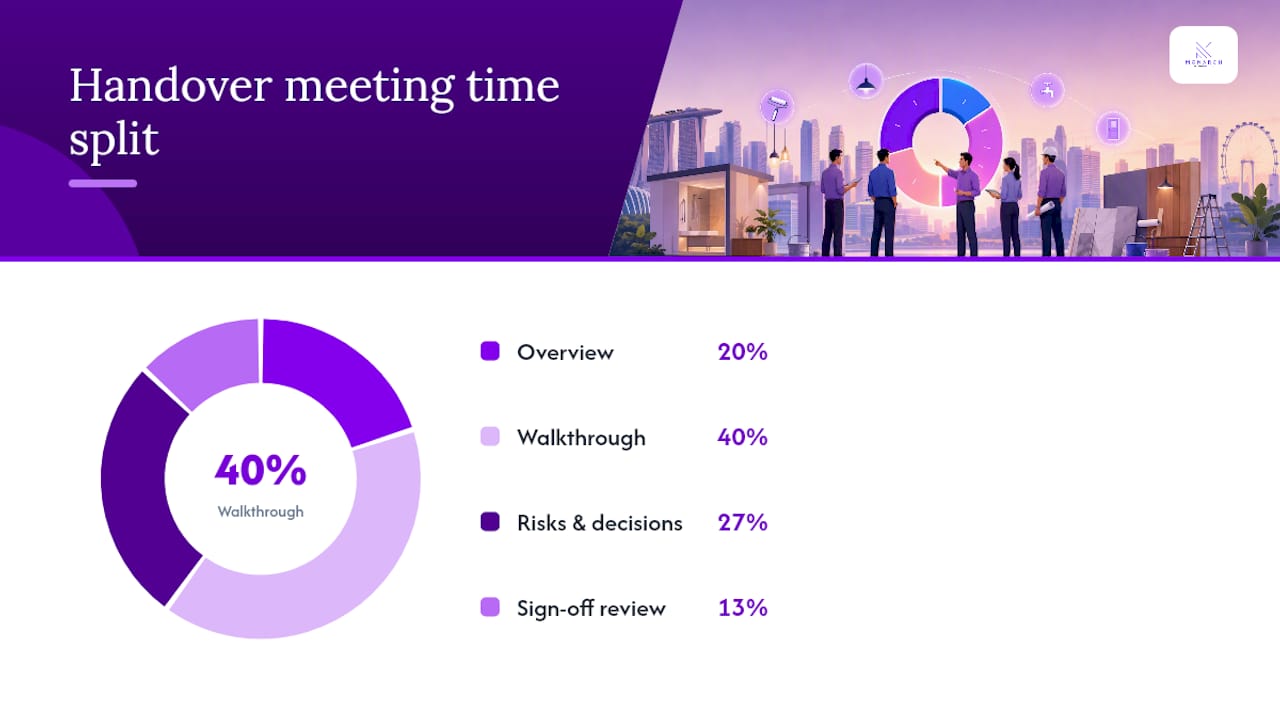
The handover meeting is where the checklist becomes real. Structure it around four blocks: a 15-minute overview of project status and objectives, a 30-minute walkthrough of access, files, and processes, a 20-minute discussion of open risks and the decision log, and a final 10 minutes to review and sign the acceptance form. That structure keeps a 75-minute meeting from sprawling into an unfocused two-hour conversation.
Four roles should be in the room, in person or on a call:
The outgoing owner, who presents the status snapshot and answers direct questions about anything undocumented.
The incoming owner, who confirms understanding out loud rather than nodding along, since silent agreement is how gaps get missed.
The project sponsor or client, who validates that the deliverables match what was originally promised.
Relevant subject matter experts, brought in only for the specific systems or processes that need deeper explanation.
The sign-off form itself needs five fields at minimum: acceptance criteria as originally defined, items formally accepted, items deferred with a resolution date attached, space for signatures or a digital approval stamp, and a date. Failing to establish this kind of clear ownership and structured transfer is one of the most commonly cited reasons project transitions break down, since ambiguity about who owns what after the meeting is exactly what a signed form is meant to eliminate.
Record minutes during the meeting, assign any post-handover actions to a named owner with a due date, and track those actions to completion instead of letting them dissolve into a forgotten email thread.
What Goes Wrong (and How to Catch It Before Sign-off)
The same handful of mistakes shows up across industries. Access credentials get shared informally instead of formally transferred, so nobody actually owns the account. Verbal decisions never make it into writing, so the reasoning behind a choice disappears with the person who made it. Snagging lists or certificates get treated as optional paperwork instead of prerequisites for sign-off. And outgoing owners assume the incoming team already knows things that were never actually documented anywhere.
Before you call a handover complete, run this short verification pass:
Log into every system on the access list using the credentials as documented, not from memory.
Have the incoming owner perform one routine task unassisted while you watch.
Confirm the file repository contains everything the checklist promises, with no “ask me for this one” exceptions.
Call or message each key stakeholder to confirm they know who to contact going forward.
Unresolved punch-list items need a home in a tracked system with a unique ID per item, not a scribbled note that gets lost after the meeting ends. If critical items remain unresolved, meaning safety issues, missing certificates, or defects that block normal use, withhold final sign-off or final payment until they’re closed. A handover accepted with major gaps still open just relocates the problem instead of solving it.
Pro Tip: If a punch-list item can’t be resolved before the handover date, don’t leave it undated. Assign a specific repair deadline and a named responsible party, even if that party is the outgoing team returning for a follow-up visit.

Copy This One-Page Handover Checklist Right Now
For a quick, recurring operational handoff, you don’t need the full nine-category document. Use this compact table format instead, with one row per item:
For lightweight, recurring handoffs, like a weekly on-call rotation or a rotating client account manager role, trim this even further to just access, current status, and the name of the next owner.
To expand this into the full checklist, take two steps. First, add the risk and decision log as its own section rather than folding it into “notes.” Second, attach a formal sign-off page with acceptance criteria spelled out, rather than relying on a verbal “looks good” in a meeting. Those two additions turn a quick reference sheet into a document that will actually hold up if a dispute arises later.
How to Keep Communication Clear During the Transition
A handover fails almost as often from silence as from missing documents. Set a single communication channel for the entire transition period, whether that’s a dedicated Slack thread, email chain, or shared project board, and tell every stakeholder where to look before questions start scattering across five different tools.
Send a short status update at each major milestone: when the checklist is compiled, when the handover meeting is scheduled, and immediately after sign-off is completed. Stakeholders who feel informed rarely escalate; stakeholders left guessing usually do, often at the worst possible moment.
Assign one point of contact for questions during the transition window, ideally the incoming owner once they’ve had the walkthrough, backed up by the outgoing owner for anything genuinely outside their new knowledge. Splitting this responsibility without naming a lead creates the exact confusion a handover checklist is supposed to prevent.
For client-facing handovers, a brief closing message that summarizes what was delivered, what’s pending, and who to contact going forward does more to build confidence than a lengthy report nobody reads in full. Keep it to a few sentences and attach the formal documents for anyone who wants the detail.
If the transition spans multiple time zones or involves a team working async, set explicit response-time expectations rather than assuming everyone will read messages at the same pace. A transition plan that ignores time zones tends to stall exactly when momentum matters most.
Making Training and Knowledge Transfer Actually Stick
Reading a document is not the same as being able to do the job. Schedule at least one live session where the incoming owner watches the outgoing owner perform a real task, then reverses roles and performs it themselves while being observed. That reversal is where gaps in understanding actually surface, not during a passive walkthrough.
Break training into short, focused sessions tied to specific processes rather than one long marathon meeting that tries to cover everything at once. A 30-minute session on the approval workflow, followed separately by a 30-minute session on vendor management, retains far better than a two-hour session covering both.
Record these sessions when the tools allow it. A recorded walkthrough becomes a reference the incoming owner can revisit weeks later, long after the outgoing owner has moved on to something else entirely.
For technical or specialized processes, pair the live session with written step-by-step notes the incoming owner can follow independently the first time they attempt the task alone. Verbal explanation alone tends to fade within days; a written reference paired with hands-on practice tends to stick.
End each training session by asking the incoming owner to summarize what they just learned, in their own words. That summary reveals immediately whether the knowledge actually transferred or whether it just sounded clear in the moment.
Don’t Skip the Contract and Compliance Review
Every handover involves obligations that outlive the transition meeting itself, and skipping this review is how organizations end up in disputes months later. Before final sign-off, revisit the original contract or scope agreement and confirm every deliverable it promises has actually been met, not just the ones that were top of mind during execution.
Check warranty terms specifically. Note the start date, the duration, and what triggers a claim, since warranty periods often begin at handover rather than at project completion, and that distinction matters if something fails later. For regulated industries or licensed trades, confirm that any required certifications, permits, or inspections are filed and accessible, not just completed verbally.
Review any ongoing obligations that survive the handover: maintenance commitments, service level agreements, or renewal dates on licenses and subscriptions tied to the project. These items are easy to overlook because they don’t feel urgent on handover day, yet they’re exactly the kind of detail that causes a compliance gap discovered six months too late.
If the project involved subcontractors or third-party vendors, confirm their contracts either transfer to the new owner or terminate cleanly, with no ambiguity about who holds responsibility for their performance going forward. A handover that transfers the project but leaves vendor relationships unclear creates a liability gap nobody notices until a vendor invoice arrives with no clear owner to approve it.
What Renovation Handovers Taught Us About Documentation
Renovation projects carry handover requirements that office-based projects rarely face: certificates, warranties, and snagging photos that a homeowner will reference for years after the crew leaves. A defect log without a wide shot and a close-up photo is a debate waiting to happen, and a decision log without the reasoning behind a material change is a conversation the client will want to have again at the worst possible time.
Monarch carpenters builds its own handovers around a staged approach, documenting as-built details, commissioning records, and warranty terms as the project progresses rather than scrambling to assemble them at the finish line. That habit of recording the “why” behind a decision, not just the decision itself, keeps a settled choice settled. It’s a small discipline, but it’s the one clients notice most once the project is behind them.
— Seth Wayne
Want a Handover Someone Else Manages Entirely?
Everything above assumes you’re building and running your own checklist, which works well when you have the time and the internal structure to manage it. If you’re renovating a home or commercial space in Singapore and would rather not own that process yourself, Monarch carpenters is a design-build alternative where the handover is baked into the project from day one, rather than assembled at the end under deadline pressure.

A managed handover through Monarch carpenters includes a full document pack covering as-built specifications, commissioning records, and warranty terms, a resolved snagging list rather than an open one, and a defined post-handover support window so questions after move-in have a clear place to land. Clients consistently point to design work that feels considered rather than templated, with pricing that balances cost and quality. Browse completed projects to see how that documentation shows up in real spaces, then visit the Monarch carpenters landing page to request a quote and start a conversation about your renovation.
Templates and Guides Worth Bookmarking
A few external resources are worth keeping alongside your own checklist. Smartsheet’s template library offers separate downloadable formats for simple, construction, and software handovers, each with built-in fields for tracking planned versus actual dates. Process Street’s transition plan checklist is built to live inside a task management system, which makes it easier to review and refine after each real handover rather than letting it go stale in a folder.
Use an industry-specific template rather than one generic document trying to cover construction, software, and internal transfers all at once. The mandatory fields are different enough that a one-size-fits-all approach guarantees you’ll miss something relevant to your specific project type.
Sources
FAQ
What Should Be Included in a Project Handover?
A complete handover includes the project overview, a current status snapshot, an access and login list, file locations, key stakeholder contacts, documented workflows, a risk and decision log, and a formal sign-off form with acceptance criteria.
How Do You Create a Handover Checklist?
Start by listing every category the incoming owner needs to operate independently, access, documents, contacts, and processes, then organize them into a document with clear owners and due dates for each item, following a structure like the category-by-category checklist above.
What Does a Handover Sheet Look Like?
A simple handover sheet is typically a table with columns for item, owner, due date, status, and notes, while a full handover pack expands into separate sections for status, access, documentation, risks, and sign-off.
What Is the Checklist for a Software Project Handover?
A software handover checklist adds repository and admin access, domain and hosting credentials, staging versus production environment notes, and API keys with their renewal dates, layered on top of the standard project overview and status sections.
When Should You Start a Project Handover Checklist?
Begin compiling the checklist about two weeks before the transfer date, since starting the process early and spreading it across several weeks rather than compressing it into the final days reduces the chance of missed access, undocumented decisions, or an unresolved snagging list at sign-off.
Recommended
Comments