
Ergonomics in Home Design Explained for Homeowners
- Monarch

- 6 days ago
- 9 min read
TL;DR:
Ergonomic home design optimizes furniture and layout to support natural posture, reducing fatigue and injury. It applies principles like spinal support, reach zones, and adjustability across all rooms for lasting comfort and function. Integrating invisible, well-crafted ergonomics creates beautiful spaces that feel naturally supportive and health-conscious.
Ergonomics in home design is the science of adapting your living spaces and furniture to fit the natural posture, movement, and physical needs of the people who use them. Known formally as human factors engineering, this discipline goes far beyond buying a comfortable chair. It shapes how your kitchen counters align with your elbows, how your sofa supports your spine, and how light in your home office protects your eyes by 4pm. When applied well, home design ergonomics turns every room into a space that works with your body rather than against it, reducing fatigue, preventing injury, and making daily life genuinely more comfortable.
What are the foundational principles of ergonomic home design?
Ergonomics is often misunderstood as simply designing for comfort. Its true goal is designing rooms that support sustained, healthy use over years, not just a pleasant first impression. These principles form the backbone of every well-considered home.
Spinal alignment and lumbar support
The human spine has a natural S-curve, and every seat, desk, and bed in your home either supports or fights that curve. Chairs and sofas that flatten the lumbar region force the lower back muscles to work overtime, leading to chronic fatigue. Ergonomic design specifies furniture that maintains the spine’s natural shape during seated, standing, and reclining positions.
Comfort reach zones

Everything you use daily should be reachable without twisting, bending, or stretching. In the kitchen, this means placing frequently used items between hip and shoulder height. In the living room, it means side tables at a height where you can set down a glass without leaning. Designing around reach zones eliminates the small, repetitive strains that accumulate into real injury over time.
Flow and circulation
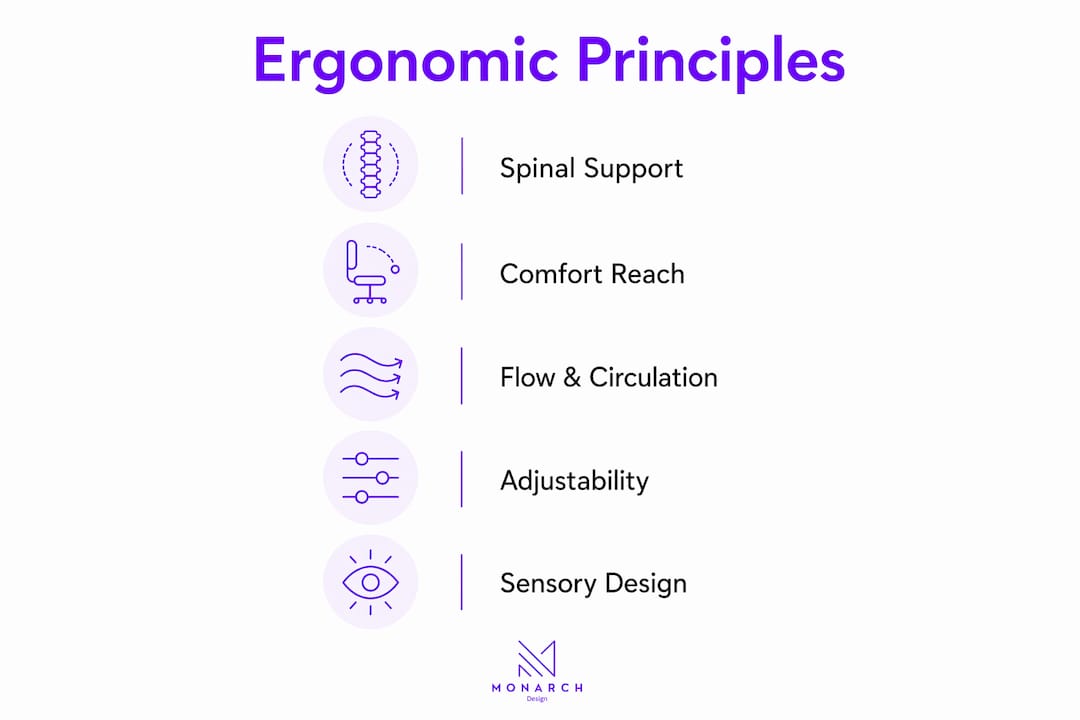
Minimum 90cm clearance in high-traffic zones is the standard for proper flow and comfort. This figure comes from human movement research and accounts for the natural sway of walking, carrying objects, and passing another person. Rooms that fall below this threshold force awkward, compensating movements that strain joints and create bottlenecks.
Adjustability and personalized fit
No two bodies are identical, so the most ergonomic spaces are adjustable. Sit-stand desks, chairs with adjustable armrests and seat height, and modular shelving systems all allow occupants to configure their environment to their own proportions. This is especially relevant in shared spaces like home offices used by multiple family members.
Sensory design
Ergonomics extends beyond the physical. Layered lighting, acoustic management, and thermal comfort are all part of a fully ergonomic home. A room that is visually harsh, acoustically fatiguing, or thermally uncomfortable creates stress on the nervous system that undermines the benefits of even the best furniture.
Pro Tip: Before buying any new furniture, measure your own body. Seat height should allow your feet to rest flat on the floor with knees at 90 degrees. This single measurement eliminates most common chair-related back complaints.
How does ergonomic furniture enhance well-being and functionality at home?
Furniture is where ergonomic principles become tangible. The wrong chair, sofa, or desk can undo an otherwise well-designed room. Here is how to evaluate and select furniture that genuinely supports your health.
Chair seat-back angle. A seat-back angle between 100 and 130 degrees, combined with lumbar support, reduces spinal disc pressure and paraspinal muscle fatigue. This is the single most evidence-backed specification in ergonomic seating. Chairs that hold you bolt upright at 90 degrees are not ergonomic, despite looking disciplined.
The two-finger sofa rule. When seated on a sofa, you should be able to fit two fingers between the seat edge and the back of your knees. Too deep a seat forces you to slouch or perch forward, both of which compromise circulation and spinal support. This simple test eliminates most poorly proportioned sofas immediately.
Materials and adjustability. Foam density, fabric breathability, and frame construction all affect long-term ergonomic performance. High-density foam maintains its support profile for years, while low-density foam collapses within months. Adjustable armrests, seat depth sliders, and tilt tension controls allow the chair to conform to the user rather than the reverse.
Technology integration. Gas-spring monitor arms, soft-floor casters on office chairs, and cable management systems are ergonomic hardware that most homeowners overlook. A monitor arm, for example, allows precise positioning of the screen without being constrained by desk depth, which is one of the most common causes of neck strain in home offices.
Common pitfalls. Poor monitor height, wrong chair height, and inadequate armrests account for the majority of home office discomfort complaints. 59.1% of remote workers report back pain linked directly to improper chair height and monitor positioning. A 10-minute setup audit, adjusting these three variables, resolves most issues without buying anything new.
Pro Tip: When testing a dining chair or office chair in a showroom, sit for at least five minutes before deciding. Ergonomic failure almost never shows up in the first 30 seconds.
How can ergonomic principles be applied to different home areas?
Each room in your home has distinct ergonomic demands. Applying the right principles in the right context is what separates a thoughtfully designed home from one that simply looks good.
Home office setup
The home office is where ergonomic failures cause the most measurable harm. Monitor height is the most commonly mismanaged variable. The top third of your monitor should sit at eye level, with the screen positioned 20 to 30 inches from your face and your gaze angled slightly downward at 5 to 15 degrees. This position reduces neck muscle fatigue by allowing the head to rest in its natural forward tilt rather than craning upward.
Sit-stand desks add significant ergonomic value when used correctly. Alternating between sitting and standing every 30 to 60 minutes reduces the cumulative spinal load of prolonged sitting. Lighting in the home office should be layered, with ambient light preventing harsh contrast and a task light positioned to illuminate your work surface without creating screen glare.
Kitchen ergonomics
Counter height is the defining ergonomic variable in any kitchen. The standard 90cm counter height suits a person of roughly 170cm. If you are taller or shorter, custom counter heights reduce the shoulder and back strain that comes from working at the wrong elevation for hours each day. A furniture layout plan that accounts for your actual height makes a measurable difference in kitchen comfort.
The “drawer-first” policy places the most frequently used items in drawers at waist height rather than in overhead cabinets. This eliminates repetitive overhead reaching, which is a leading cause of shoulder strain in kitchen environments. The functional triangle between the sink, stove, and refrigerator should have legs totaling no more than 660cm to minimize unnecessary walking.
Living room and bedroom considerations
Room | Key ergonomic priority | Practical standard |
Living room | Seating support and circulation | 90cm clearance around furniture; sofa seat height 42 to 45cm |
Home office | Monitor and chair alignment | Eye-level monitor; 100 to 130 degree seat-back angle |
Kitchen | Counter height and reach zones | Counter at elbow height; high-use items between hip and shoulder |
Bedroom | Mattress support and access | Bed height 45 to 60cm; clear pathways for elderly and children |
Bedroom ergonomics often focuses on mattress firmness, but bed height matters just as much. A bed that is too low forces deep knee bends when sitting down and standing up, which creates cumulative joint stress over years. For elderly occupants or children, clear pathways and accessible storage at reachable heights are the most impactful ergonomic investments.
What sensory and environmental factors contribute to ergonomic home design?
Physical furniture and spatial layout address only part of the ergonomic picture. Sensory and environmental factors shape how your nervous system responds to a space, and they are frequently the missing piece in homes that feel uncomfortable despite good furniture.
Layered lighting. Ambient, task, and accent lighting work together to eliminate harsh contrast and reduce eye strain. Relying on a single overhead fixture creates deep shadows and forces the eyes to constantly adjust, which causes the familiar 4pm headache that many home workers experience. Task lighting at a desk or kitchen counter should be positioned to illuminate the work surface without reflecting off screens or glossy surfaces.
Acoustic management. Hard surfaces in open-plan homes create reverberation that causes auditory fatigue, a form of stress that most people attribute to general tiredness rather than its actual cause. Acoustic panels, rugs, upholstered furniture, and soft furnishings all absorb sound and reduce this effect. The role of soft furnishings in acoustic comfort is one of the most underappreciated aspects of ergonomic home design.
Thermal comfort. A room temperature between 20°C and 22°C supports both muscle relaxation and cognitive performance. Rooms that are too cold cause muscles to tense, which amplifies the discomfort of poor posture. Rooms that are too warm reduce alertness and increase fatigue. Automated solar shading and smart thermostats make maintaining this range practical without constant manual adjustment.
Technology integration. Motorized blinds, circadian lighting systems that shift color temperature throughout the day, and smart HVAC controls all contribute to a sensory environment that supports ergonomic comfort without requiring occupants to manage it manually.
Pro Tip: Install a dimmer switch on every light in your home office and living room. The ability to reduce light intensity in the evening costs almost nothing and has a direct impact on sleep quality and eye comfort.
Key takeaways
Ergonomic home design works because it aligns every element of a space, furniture, layout, lighting, and acoustics, with the physical and sensory needs of the people who live there.
Point | Details |
Spinal support is non-negotiable | Choose chairs and sofas with lumbar support and a seat-back angle between 100 and 130 degrees. |
Circulation space prevents strain | Maintain at least 90cm of clearance in all high-traffic zones to allow natural movement. |
Sensory factors matter as much as furniture | Layer lighting, manage acoustics, and maintain 20 to 22°C to reduce fatigue beyond physical discomfort. |
Adjustability extends ergonomic value | Sit-stand desks and adjustable chairs accommodate multiple users and changing needs over time. |
Room-specific standards exist | Apply counter height, monitor position, and bed height standards tailored to each room’s function. |
Why ergonomics should be invisible in a well-designed home
I have worked on enough residential projects to know that the word “ergonomics” makes some homeowners nervous. They picture medical-grade equipment and clinical aesthetics, the kind of chair that belongs in a physiotherapy clinic rather than a living room. That instinct is understandable, but it reflects a misreading of what good ergonomic design actually looks like when it is done well.
The best ergonomic homes I have seen share one quality: you cannot tell they are ergonomic. The lumbar support is built into a beautifully upholstered sofa. The sit-stand desk is finished in North American walnut with custom millwork integration that makes it look like a piece of furniture rather than a piece of equipment. The monitor arm disappears behind a panel. This is what bespoke built-in furniture makes possible: ergonomic hardware that performs at a medical-grade level while contributing to the visual language of the room.
The mistake I see most often is homeowners treating ergonomics as a retrofit. They buy a beautiful sofa, live with it for six months, and then add a lumbar cushion because their back hurts. That cushion is a symptom of a design decision that should have been made earlier. When you plan your interior design from the start with ergonomic principles embedded, you get a home that is both beautiful and genuinely comfortable, without the compromises that come from fixing problems after the fact.
Ergonomic investment also pays off financially. ROI from ergonomic programs ranges from 3 to 15 times the initial investment when measured against reduced healthcare costs and improved productivity. That figure applies to workplaces, but the logic holds at home. A well-designed home office that prevents chronic back pain is worth far more than the cost of the chair and desk that made it possible.
— Seth Wayne
How Monarch Carpenters brings ergonomic design to life

Monarch Carpenters has built a reputation in Singapore for delivering ergonomic home interiors that clients consistently describe as both beautiful and genuinely comfortable, at a cost that surprises them. The studio’s in-house team of designers and carpenters works closely with each client to embed ergonomic principles into custom cabinetry, furniture layouts, and spatial planning from the first design conversation. The result is spaces where the support is invisible and the craftsmanship is not. If you are planning a new home or renovation and want ergonomic design that does not compromise on aesthetics, explore Monarch’s approach and see why clients keep coming back.
FAQ
What is ergonomics in home design?
Ergonomics in home design is the practice of adapting furniture, layouts, and environmental conditions to fit the natural posture and movement of the people who live there. The goal is to reduce physical strain, prevent injury, and improve daily comfort across every room.
What are the most important ergonomic furniture tips for a home office?
Position the top third of your monitor at eye level, 20 to 30 inches from your face, and use a chair with a seat-back angle between 100 and 130 degrees with lumbar support. These two adjustments address the factors behind the majority of home office back and neck complaints.
How do I create ergonomic spaces in a small home?
Ergonomics for small spaces focuses on clearance, adjustability, and multi-function furniture. Maintain at least 90cm of walking clearance, choose furniture with adjustable heights, and prioritize storage at reachable zones between hip and shoulder height to eliminate awkward bending and reaching.
What temperature is best for ergonomic comfort at home?
A room temperature between 20°C and 22°C supports both muscle relaxation and mental focus. Temperatures outside this range cause muscles to tense or alertness to drop, which amplifies the discomfort of any existing postural issues.
Is ergonomic home design only for home offices?
No. Ergonomic principles apply to every room, including kitchens with counter heights matched to the user’s elbow, living rooms with properly proportioned seating, and bedrooms with bed heights that reduce joint stress when sitting and standing. The importance of ergonomics in design extends across the entire home.
Recommended
Comments